
Fix the “nav_menu” Block Error
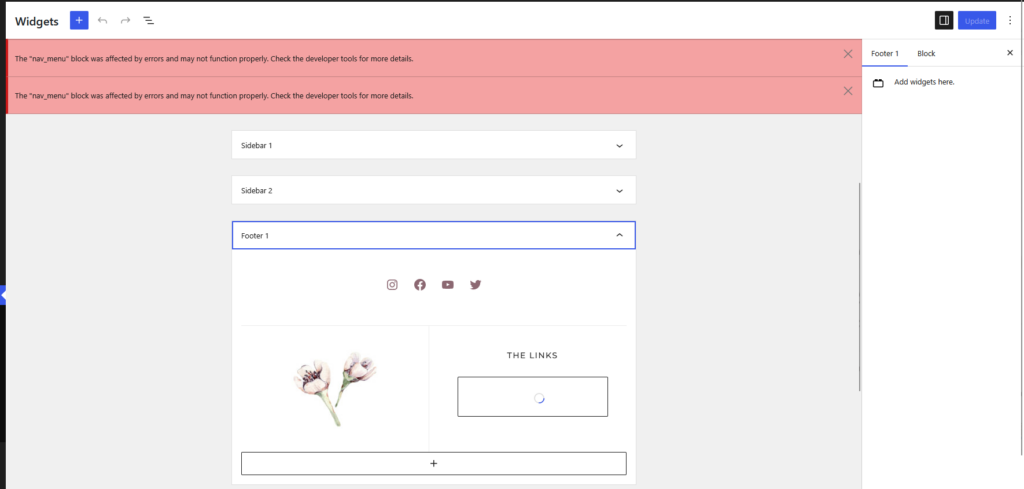
If you’re seeing the message:
“The ‘nav_menu’ block was affected by errors and may not function properly.”
don’t worry. This is a common WordPress issue that can sometimes occur after importing your demo content.
Fortunately, it’s easy to fix.
Recreate the Navigation Block
Step 1: From your WordPress dashboard, go to Appearance → Widgets.
Step 2: Locate the Navigation block displaying the error message.
Typically found in one of the Footer Widgets
Step 3: Delete the Navigation block.
Step 4: Click the + button and add a new Navigation block.
Step 5: Select your existing navigation menu from the list.
Step 6: Click Update to save your changes.
Helpful Tip: Deleting the Navigation block does not delete your menu. It only removes the block displaying the menu. Your menu items remain safely stored in Appearance → Menus.
Still Seeing the Error?
If the error continues after recreating the Navigation block, try clearing your website and browser cache, then refresh the editor.
If the issue persists, we’d be happy to help.

Still Need Help?
Didn’t find the solution you were looking for? Browse more troubleshooting articles or contact our support team.